🛡️ Quick Summary: Anti-Detect Browser & Proxy Architecture in 2026
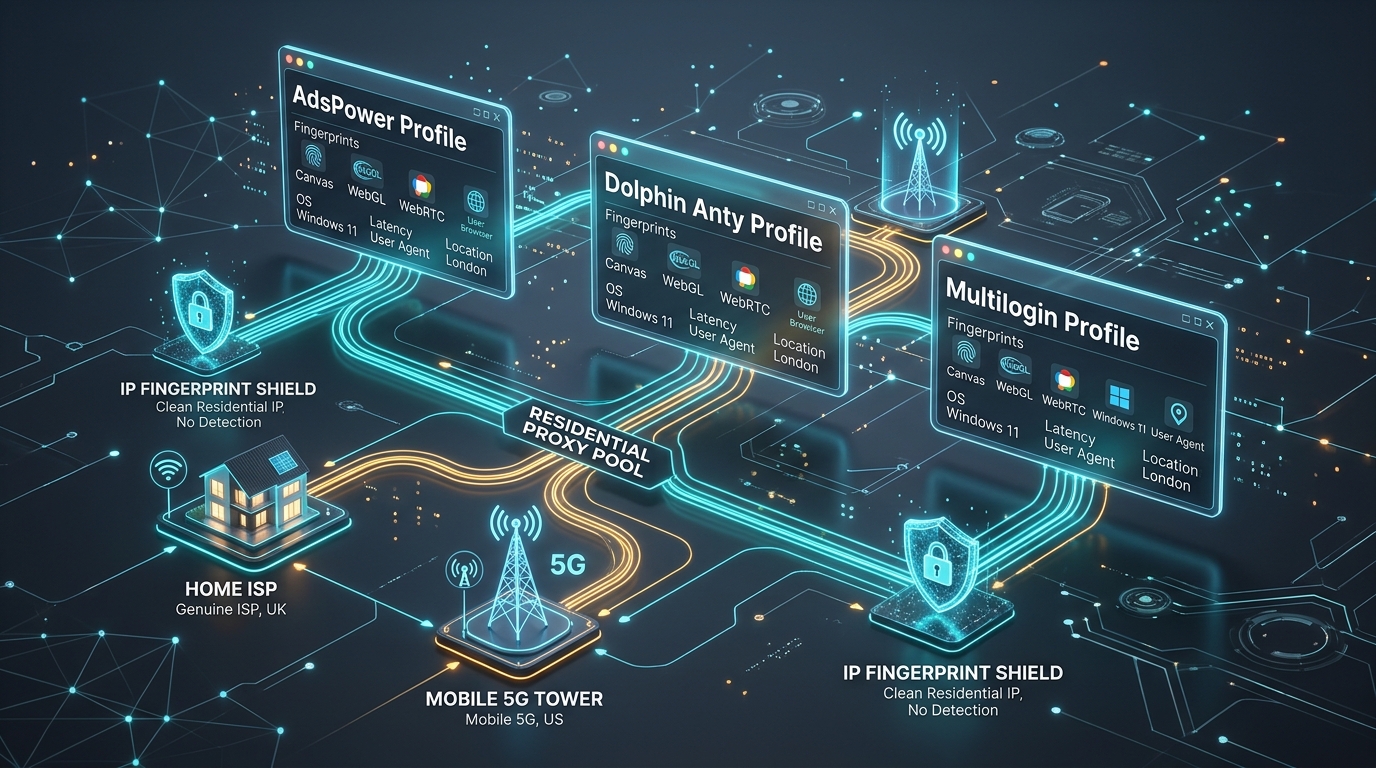
Executive Answer: An anti-detect browser is only as effective as the proxy network bound to each profile. In 2026, automated tracking engines (Facebook Pixel, TikTok, Google Ads, Amazon, and Cloudflare) detect multi-accounting through composite fingerprint correlation. To operate 10 to 1,000+ accounts without bans, you must pair isolated browser environments (like AdsPower, Dolphin{anty}, or Multilogin) with dedicated Static ISP proxies or 4G/5G mobile proxies, strictly matching each profile’s timezone, WebRTC parameters, and geolocation.
- For Paid Advertising (Meta, Google, TikTok): Bind dedicated Static ISP (clean residential ASN) or 4G/5G mobile proxies with sticky sessions to maintain high account trust and prevent checkpoint verification loops.
- For E-Commerce & Stealth Accounts (Amazon, eBay, PayPal): Assign a unique, static residential IP to each profile. Never share a single proxy node across multiple active store accounts.
- Browser Selection: Use AdsPower for automated multi-account scaling via Local API, Dolphin{anty} for agile affiliate marketing teams, and Multilogin for enterprise-grade hardware virtualization.
Operating multiple digital accounts has become standard practice for modern performance marketing, affiliate advertising, e-commerce storefront management, and web scraping operations. However, the anti-fraud algorithms deployed by major platforms like Meta, Google, TikTok, and Amazon have evolved exponentially. In 2026, basic incognito tabs, cookie clearers, and consumer VPNs will get your account permanently suspended within seconds.
Modern platforms do not merely check your login credentials; they assemble a multidimensional digital fingerprint comprising hundreds of hardware and network variables. If two supposedly independent accounts share identical Canvas entropy, WebGL rendering signatures, or originate from the same hosting datacenter IP range, automated security systems immediately link and suspend both profiles.
To establish durable, undetectable multi-accounting operations, digital operators rely on two complementary technologies: anti-detect browsers and high-reputation residential proxies. This engineering guide explains how these technologies interact, benchmarks the leading anti-detect platforms, provides step-by-step proxy binding tutorials, and outlines critical security configurations to ensure your profiles remain completely isolated.
1. The Two Halves of Digital Anonymity: Hardware vs. Network Fingerprints
A common misconception among beginner marketers is that an anti-detect browser alone provides complete anonymity. In reality, browser isolation without high-trust proxy infrastructure is completely useless. Digital identity is divided into two distinct components that must harmonize perfectly:
1. The Client-Side Hardware Fingerprint (Managed by Anti-Detect Browsers)
When your browser contacts a website, scripts query JavaScript APIs to inspect your machine’s physical hardware and software configuration. An anti-detect browser replaces your real device metrics with isolated, unique virtual hardware profiles:
- Canvas & WebGL Fingerprinting: Measures microscopic rendering variations produced by your graphics card and GPU driver. Anti-detect browsers inject subtle, imperceptible noise into pixel rendering routines so each profile generates a distinct cryptographic hash.
- AudioContext Entropy: Evaluates audio signal processing variations across sound hardware.
- Font Enumeration & Screen Metrics: Discovers installed system fonts, device pixel ratios, and monitor resolutions.
- Hardware Concurrency & RAM: Reports CPU core counts (e.g., 4, 8, 16 cores) and system memory capacity.
2. The Network Identity & IP Reputation (Managed by Proxies)
While the anti-detect browser disguises your device hardware, your proxy server dictates how network firewalls perceive your geographic location and connection legitimacy:
- ASN Classification: Autonomous System Numbers indicate whether your connection originates from an Amazon AWS server farm (Datacenter ASN) or a domestic Comcast household (Residential ISP ASN). Social media platforms instantly flag datacenter ASNs.
- IP Geolocation & Timezone: The physical location inferred from your IP address must strictly match your browser’s internal system timezone, operating system locale, and keyboard layout. Discrepancies (e.g., a London IP with a Tokyo system clock) trigger instant fraud reviews.
- WebRTC IP Leakage: Real-time browser communication protocols can expose your host machine’s true local or public IP address if your proxy routing fails to tunnel UDP traffic properly.
2. Benchmark: Leading Anti-Detect Browsers in 2026
Not all anti-detect browsers are built the same. While some focus on collaborative team workflows and fast UI profile switching, others prioritize deep browser kernel customization and headless API automation. The table below compares the leading platforms based on verified 2026 features:
| Browser Platform | Underlying Kernel | Fingerprint Accuracy | API Automation Support | Best Use Case |
|---|---|---|---|---|
| AdsPower | Chromium (SunBrowser) & Firefox (FlowerBrowser) | 99.2% Native | Local REST API, Puppeteer, Playwright, Selenium | E-commerce scaling, multi-store management, high-volume automation |
| Dolphin{anty} | Custom Chromium | 98.8% Native | REST API, Puppeteer, Selenium | Affiliate marketing, Facebook Ads, TikTok media buying teams |
| Multilogin | Mimic (Chromium) & Stealthfox (Firefox) | 99.6% Proprietary | CLI, REST API, Selenium, Puppeteer | Enterprise compliance, high-risk financial accounts, crypto airdrops |
| GoLogin | Orbita (Chromium) | 98.5% Native | Cloud API, Puppeteer, Playwright | Affordable small-team collaboration, cloud-based profile streaming |
Detailed Platform Breakdown
1. AdsPower: The Automation & E-Commerce Workhorse
AdsPower stands out for offering two independent browser rendering engines: SunBrowser (Chromium-based) and FlowerBrowser (Firefox-based). This allows operators to test profiles across different browser lineages without leaving the application. AdsPower includes a built-in RPA (Robotic Process Automation) tool that enables non-technical users to build visual web scraping or account warming workflows without writing code. For developers, its Local API seamlessly binds to Playwright and Puppeteer, allowing programmatic creation, proxy assignment, and profile launching.
2. Dolphin{anty}: The Media Buyer & Affiliate Specialist
Designed from the ground up for Facebook Ads, Google Ads, and TikTok media buyers, Dolphin{anty} excels in rapid profile organization. It allows operators to tag profiles by campaign stage, mass-import proxies, manage cookies, and bulk-update browser extensions. Its interface displays live proxy connection statuses, IP ping times, and profile geolocation with a single click, significantly reducing administrative overhead for marketing agencies.
3. Multilogin: The Enterprise Security Benchmark
As one of the pioneers in anti-detect technology, Multilogin remains the gold standard for high-security environments. Rather than applying superficial JavaScript overrides, Multilogin customizes the source code of its browser engines (Mimic and Stealthfox) at the C++ kernel level. This eliminates telltale automation leaks that modern security engines use to detect client-side spoofing. While it carries a higher price point, it provides the lowest ban rates for financial platforms, crypto exchanges, and high-tier ad accounts.
3. Choosing the Right Proxy Type for Anti-Detect Profiles
Binding the incorrect proxy protocol or network architecture to your anti-detect browser will instantly compromise your accounts. In 2026, proxy networks fall into three main categories for multi-accounting:
1. Static ISP Proxies (Static Residential): The Gold Standard for Ad Accounts
Static ISP proxies are hosted on enterprise data center connections but assigned to consumer Internet Service Providers (like AT&T, Comcast, or Verizon). Because the IP address never changes and carries an official residential ASN, security systems treat the profile as a genuine home broadband user who keeps their browser permanently logged in.
Recommended For: Facebook Business Managers, Google Ads accounts, PayPal business accounts, eBay and Amazon seller stores.
2. 4G/5G Mobile Proxies: Maximum Evasion via Cellular CGNAT
Mobile proxies route traffic through physical 4G/5G cellular modems connected to mobile carriers (T-Mobile, Vodafone, O2). Cellular networks utilize Carrier-Grade NAT (CGNAT), where hundreds of thousands of legitimate mobile subscribers share the exact same public IP address. Fraud algorithms cannot blacklist a mobile IP without simultaneously banning genuine mobile consumers, making mobile proxies virtually immune to IP bans.
Recommended For: TikTok account creation and warmup, Instagram automation, Reddit multi-accounting, and high-security bot checkpoints.
3. Rotating Residential Proxies: High Volume, Stateless Scraping
Rotating residential proxies change IP addresses either per-request or after fixed intervals (e.g., 5 to 30 minutes). While rotating pools are ideal for web scraping and data harvesting, they must be used cautiously in anti-detect browsers. If a persistent social media account suddenly switches IP addresses from New York to London during an active session, the platform will trigger security checkpoint lockouts.
Recommended For: Account registration batches, initial profile cookie warming, web data extraction, and SERP verification.
4. Step-by-Step Proxy Binding Walkthrough
Proper proxy configuration ensures that network traffic is completely encapsulated without DNS or WebRTC leaks. Below are exact step-by-step setup instructions for the leading platforms:
Setting Up Proxies in AdsPower
- Open AdsPower and click Single Import (or Batch Import for multiple profiles).
- Select your preferred browser kernel: SunBrowser (Chrome) or FlowerBrowser (Firefox).
- In the Proxy Configuration section, select your protocol:
HTTP,HTTPS, orSOCKS5. - Enter your proxy connection string using standard authentication syntax:
Proxy Type: SOCKS5
Proxy Host: residential.5-proxy.com
Proxy Port: 7000
Proxy User: customer1001-res-us
Proxy Password: secret_token_xyz - Click Check Proxy. AdsPower will execute a live latency ping, verify IP geolocation, and display the detected city, state, and ASN.
- Under Advanced Settings, ensure Timezone and WebRTC are set to
Auto-match IP. This guarantees your browser clock automatically synchronizes with the proxy’s physical location.
Setting Up Proxies in Dolphin{anty}
- Launch Dolphin{anty} and click Create Profile in the upper left corner.
- Select your profile category (e.g., Facebook, Google, Crypto).
- Navigate to the Proxy tab and click New Proxy.
- Dolphin{anty} supports unified one-line string parsing. Paste your proxy string in this format:
socks5://customer1001:[email protected]:7000
- If using a rotating mobile proxy with an external IP change link, paste the change link into the Change IP URL field. This enables one-click IP rotation directly inside the Dolphin dashboard.
- Click the Test Proxy button to confirm connection speed and IP authenticity before launching the profile.
Setting Up Proxies in Multilogin
- In the Multilogin application, click New browser profile.
- Choose your customized browser engine: Mimic (Chromium) or Stealthfox (Firefox).
- Navigate to the Proxy section on the left sidebar and select
HTTP proxyorSOCKS5 proxy. - Enter the host IP, port number, username, and password provided by your proxy provider.
- Click Check proxy. Multilogin queries its backend verification service to ensure the IP does not appear on public abuse blacklists.
- Under Timezone & Geolocation, select
Fill timezone based on the external IPto avoid clock-skew detection.
5. Advanced Profile Isolation: GoLogin and Custom Stealth Kernels
While AdsPower, Dolphin{anty}, and Multilogin represent the primary commercial options, advanced operations frequently deploy GoLogin or open-source stealth kernels like Camoufox for specialized multi-accounting workloads.
Configuring Proxies in GoLogin (Orbita Engine)
GoLogin’s proprietary Orbita browser is engineered on Chromium but modifies internal font enumeration and canvas rendering directly inside the source code. To bind proxies in GoLogin:
- Click Add Profile in the GoLogin workspace.
- Under the Proxy tab, toggle connection mode from Without proxy to Your proxy.
- Select
HTTP,SOCKS4, orSOCKS5. For high-trust social accounts, always select SOCKS5 due to its native UDP support. - Enter your proxy host, port, username, and password:
Type: SOCKS5
Server: residential.5-proxy.com
Port: 7000
Login: customer_99182-zone-residential
Password: auth_token_88291 - Click Check Proxy to verify IP response latency and confirm that the exit node matches your intended country.
- In the Geolocation tab, select Prompt or Allow based on external IP. GoLogin will dynamically spoof latitude, longitude, and accuracy radius based on the proxy’s IP coordinates.
6. Profile Cookie Warming & Session Lifecycle Management
Creating a pristine anti-detect profile and immediately connecting to a sensitive service (such as Facebook Ads Manager, TikTok Seller Center, or a crypto launchpad) triggers automated account suspension. Real human browser profiles have history, cookies, and cached assets. Professional marketing teams implement a structured Cookie Warming Lifecycle:
Phase 1: Cookie Seeding (Days 1–2)
Use AdsPower’s built-in RPA or automated Playwright scripts to navigate 30 to 50 high-traffic authoritative websites (e.g., Wikipedia, CNN, Amazon, YouTube, local news portals in your proxy’s target country). Allow the browser to accept tracking cookies and build an organic browsing history footprint.
Phase 2: Passive Social Interactions (Days 3–4)
Register or log into secondary accounts (such as a local Google account or email inbox). Perform casual searches related to common consumer products. Let the profile rest between sessions without aggressive activity.
Phase 3: Primary Account Authentication (Day 5+)
Authenticate into your primary target platform. Because your profile now possesses dozens of valid first-party and third-party tracking cookies, normal canvas noise, and an established residential IP history, anti-fraud algorithms classify the connection as a trustworthy, returning consumer.
7. Automated Proxy Failover & Health Auditing Protocol
Residential proxy nodes can occasionally drop offline if a host machine disconnects from the internet. When operating hundreds of accounts, an unmonitored proxy failure can cause browser connections to stall or leak default gateway traffic. Implement these three automated safeguards:
-
Proxy Gateway Auto-Replacement: Ensure your proxy provider utilizes a backconnect gateway server (such as
residential.5-proxy.com:7000). When an individual peer node goes offline, the gateway automatically routes your existing credentials to an active residential IP within the same geographic target without interrupting your session. - Zero-Tolerance DNS Leak Enforcements: Configure your anti-detect browser to enforce DNS through proxy. If the proxy fails to resolve DNS queries, the browser must completely halt network requests rather than falling back to your local ISP’s default DNS servers.
- Automated IP Change Alerts via Webhooks: In Dolphin{anty} and AdsPower, configure webhook notifications that ping your internal Slack or Telegram channels if a profile’s bound proxy fails its hourly health check, allowing your team to reassign a clean IP before launching active campaigns.
8. The Pre-Flight Leak Verification Checklist
Before logging into any high-value advertising or commercial account from a newly created anti-detect profile, complete this essential pre-flight verification checklist:
-
Verify WebRTC Isolation:
Visit an IP auditing tool such as
browserleaks.com/webrtcorwhoer.netinside the profile. Verify that your Public IP and WebRTC Local IP match your proxy address. If your real ISP or domestic home IP appears in the WebRTC candidate list, your browser is leaking and will be banned. -
Confirm System Timezone Alignment:
Ensure that
Intl.DateTimeFormat().resolvedOptions().timeZonematches the geographic coordinates of your proxy IP. For example, if using a proxy in Dallas, Texas, your profile must reflectAmerica/Chicago. A mismatch between IP location and system clock is the number-one cause of automated security checkpoints. -
Audit DNS Server Geolocation:
Check your DNS servers using
dnsleaktest.com. Your DNS requests must resolve through servers in the same country as your proxy. If your proxy IP is in Frankfurt, Germany, but your DNS queries resolve through a local domestic ISP in your home country, platforms will flag the connection as an unshielded proxy. -
Inspect Canvas and WebGL Entropy:
Ensure that your anti-detect browser has applied subtle noise to Canvas rendering rather than blocking Canvas entirely. Completely disabling Canvas (or returning empty images) triggers an immediate 100% bot score on modern anti-fraud engines.
-
Warm Up Your Profile with Natural Browsing Cookies:
Never create a brand-new profile, bind a proxy, and immediately navigate to a login page. Authentic human browsers accumulate hundreds of cookies over weeks. Spend 20 to 30 minutes browsing common news portals, e-commerce sites, and blogs to seed realistic tracking cookies before initiating critical account activity.
9. People Also Ask (PAA) & Frequently Asked Questions
Recommended Technical Reading on 5-Proxy.com
Deepen your expertise in proxy engineering, anti-bot bypass, and web infrastructure: