
Proxies and VPNs are often mentioned in the same breath, and at first glance they do the same thing: they put a server between you and the websites you visit, so those sites see the server’s IP address instead of yours. Look a little closer, though, and they are built for different jobs.
Choosing the wrong one can mean paying for features you don’t use, or worse, assuming you are protected when you aren’t. This guide explains how each one works, where each one shines, and how to decide which you actually need.
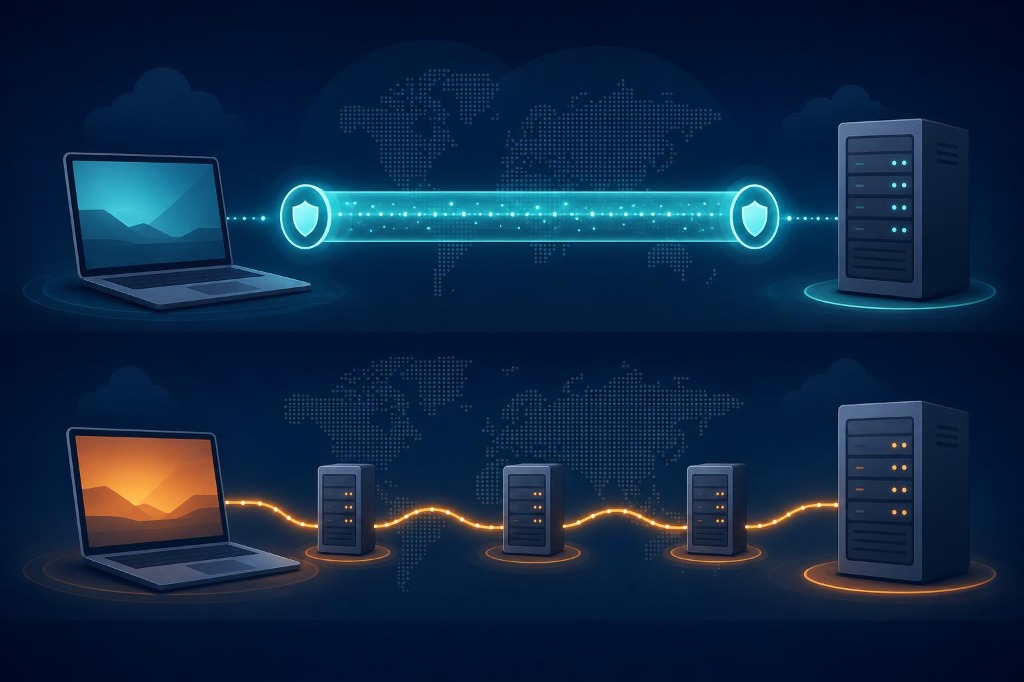
How a proxy works
A proxy server acts as a middleman for specific traffic. When an app or browser is set to use a proxy, its requests go to the proxy first, and the proxy forwards them to the destination. The website sees the proxy’s IP address, not yours.
A few points define how proxies behave:
- They work per application. You configure a proxy in a browser, a scraping tool or a specific app. Other traffic on your device goes out normally.
- They usually don’t encrypt traffic. An HTTP or SOCKS5 proxy changes the route of your traffic, but it doesn’t add a layer of encryption between your device and the proxy. If the site uses HTTPS, the content is still encrypted end to end; if it doesn’t, it isn’t.
- They come in different types. Datacenter proxies are fast and inexpensive. Residential proxies use IP addresses assigned to home connections and look like ordinary users. Mobile proxies use carrier IP addresses. Rotating proxies change IP addresses automatically, per request or at set intervals.
That flexibility is why proxies are popular for tasks that need many IP addresses or IPs in specific locations.
How a VPN works
A VPN (virtual private network) creates an encrypted tunnel between your device and a VPN server. Once it’s on, all of your device’s internet traffic, from every app, goes through that tunnel.
The key differences:
- It covers the whole device, not just one app.
- It encrypts traffic between you and the VPN server, so your internet provider, the hotel Wi-Fi owner or anyone else on the local network can’t see what you are doing, only that you are connected to a VPN.
- You usually get one IP address at a time, chosen from the provider’s server locations.
The trade-off is that you are now trusting the VPN provider with the traffic you used to show your internet provider. Its logging policy, jurisdiction and track record matter.
Proxy vs VPN at a glance
| Feature | Proxy | VPN |
|---|---|---|
| Scope | Selected apps or browsers | Whole device |
| Encryption | Usually none of its own | Encrypted tunnel to the server |
| IP options | Many, including residential and rotating | One at a time, from server locations |
| Typical speed | Fast, little overhead | Slightly slower due to encryption |
| Best for | Automation, multiple accounts, geo-testing, scraping | Everyday privacy, public Wi-Fi, hiding activity from your ISP |
When a proxy is the better choice
Proxies are the better tool when you need control over IP addresses:
- Managing several accounts. Social media managers and e-commerce sellers often need each account to appear from a different, stable IP address.
- Web scraping and data collection. Rotating proxies spread requests over many IPs, so collection tools don’t run into rate limits.
- Price and ad verification. Businesses check how prices, search results and ads appear in different countries and cities.
- Testing websites and apps from different locations, without changing the settings of your whole device.
- Using one app through another IP while everything else stays normal, such as routing one browser profile through a residential IP.
For these jobs, a VPN’s single IP address and device-wide tunnel would get in the way. If you need reliable proxy infrastructure, check our Best Proxy Providers 2026 guide.
When a VPN is the better choice
A VPN is usually the right tool for personal privacy:
- Public Wi-Fi. In cafés, airports and hotels, a VPN encrypts traffic so others on the network can’t snoop on it.
- Hiding browsing from your internet provider. Your ISP sees that you are using a VPN, but not which sites you visit.
- Protecting every app at once, including ones that don’t support proxy settings.
- Travel. A VPN helps keep a consistent connection to services from home while you are abroad.
If your goal is “I want my everyday internet use to be more private”, a VPN is the simpler and safer starting point.
Can you use both?
Yes, and many people do. A common setup is a VPN running on the device for general privacy, with a proxy configured in a specific browser profile or tool for tasks that need particular IP addresses. Just keep in mind that every extra hop adds a little latency, and that each provider you add is another company you are trusting.
For example, an online seller might keep a VPN on their laptop at all times for safe browsing on public networks, while a dedicated browser profile uses a separate residential proxy for each marketplace account they manage. Each tool does the job it is best at, and neither gets in the way of the other.
How to choose a provider
Whichever you pick, the provider matters as much as the technology. Before you pay, check:
- Logging policy. What does the provider record, and for how long? Independent audits are a good sign.
- IP quality. For proxies, ask where residential IPs come from and whether they are ethically sourced. Blacklisted IPs will cause more problems than they solve.
- Protocols and support. SOCKS5 and HTTPS for proxies; WireGuard or OpenVPN for VPNs. Responsive support matters when something breaks.
- Locations. Make sure the countries and cities you need are covered.
- Trial or refund policy, so you can test performance before committing.
- Payment options. Paying with a card links your name to the account. Many privacy-focused proxy and VPN providers accept cryptocurrency, including Monero (XMR), which keeps payment details private. Directories such as MoneroDir list VPNs, proxy services and hosting providers that accept XMR.
Common mistakes to avoid
- Assuming a proxy encrypts your traffic. Most don’t. Use HTTPS websites, or a VPN, when the connection itself needs protecting.
- Using free proxies or VPNs. Running servers costs money; free services often make it back by logging, injecting ads or selling data. (If you only need temporary testing IPs, stick to transparent datasets like our free proxy list rather than trusting unknown free apps.)
- Forgetting about leaks. Check for DNS and WebRTC leaks, which can expose your real IP even when a proxy or VPN is active.
- Logging into personal accounts through shared IPs. This can trigger security checks or link accounts you meant to keep separate.
The bottom line
Proxies and VPNs both hide your IP address, but they solve different problems. Choose a proxy when you need flexible, app-level control over IP addresses for work like account management, scraping or geo-testing. Choose a VPN when you want simple, encrypted, device-wide privacy for everyday browsing and public networks.
Many people end up using both. Whatever you choose, pick a trustworthy provider, check its logging policy, and consider paying in a way that keeps your personal details out of the picture.