Buying Guides · 13 min read
Best Proxies for Ticketmaster (2026): ISP vs Residential + Setup That Avoids Queue Bans
ISP proxies or residential proxies for Ticketmaster in 2026? How the queue and its bot defences actually work, which proxy type survives them, and the setup rules that keep sessions out of the ban bucket.
Author
5Proxy Editorial
Published
August 9, 2026
Last updated
August 25, 2026
Reading time
13 minutes
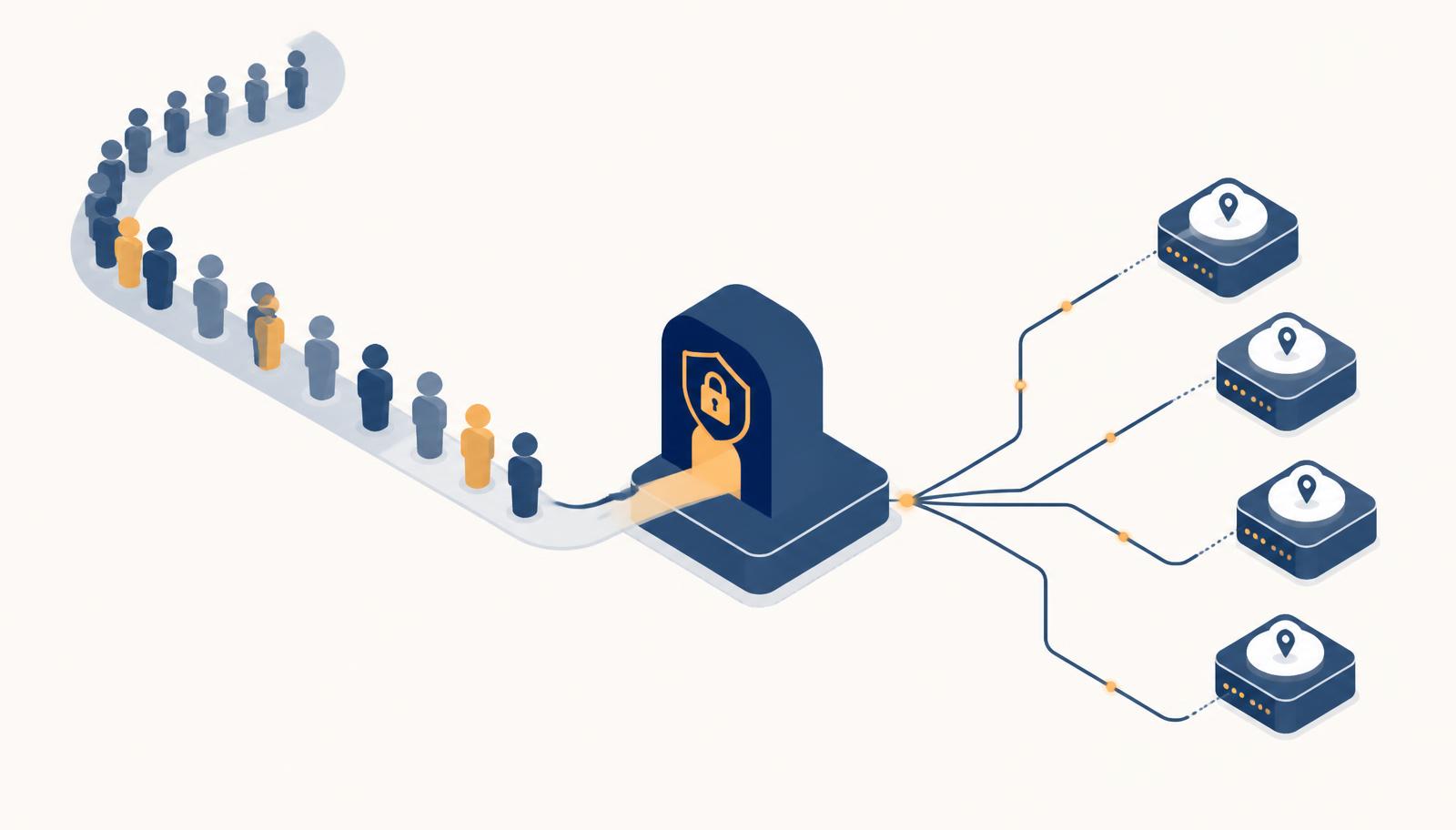
Ticketmaster is one of the hardest consumer targets on the public internet. It is not hard because the pages are complex — they are not. It is hard because the entire funnel is built around a single question: *are these requests coming from one person, or from an operation pretending to be many people?* Every proxy decision you make either helps you answer that question convincingly or hands the answer away for free.
This guide covers what the queue actually inspects, why ISP proxies and residential proxies behave differently under that inspection, which one to buy for which job, and the setup discipline that separates a session that reaches checkout from one that gets flushed at the door.
A note before anything else. Using proxies to bypass purchase limits or to buy tickets for resale violates Ticketmaster's terms of service and, in many jurisdictions (the US BOTS Act, the UK's Breaching Limits on Ticket Sales regulations, and comparable rules across the EU), is unlawful. Nothing here is a promise that a proxy will get you tickets, and no configuration makes automated purchasing legal where it is not. Most legitimate readers land here for monitoring, price research, availability tracking, or accessing a regional storefront from abroad. That is the use case this guide is written for.
The short answer
| Your job | Buy | Why |
|---|---|---|
| Monitoring, price and availability tracking at scale | Residential, rotating | Large pool, cheap per request, IP burn is expected and irrelevant |
| One stable session that must survive a long queue | ISP (static residential) | Residential-trust ASN with datacenter stability — the connection does not drop mid-queue |
| Regional storefront access from another country | ISP in the target country | Consistent geo, consistent IP, no mid-session country flips |
| High-volume scraping of event pages | Residential with sticky sessions | Rotation absorbs rate limits; sticky windows keep a page render coherent |
| Anything at all | Not datacenter | Cheap subnets are pre-scored and rejected before the page loads |
If you only remember one line: residential wins on breadth, ISP wins on endurance. The queue punishes instability far more than it punishes an unfamiliar IP.
How Ticketmaster's queue actually filters traffic
The visible part is a waiting room — usually Queue-it or Ticketmaster's own Smart Queue — that issues you a token and a position. The invisible part is a scoring pipeline that runs before, during and after that wait. Understanding the four layers explains almost every ban you will ever see.
1. Network reputation
The first check happens before a single pixel renders. Your exit IP is looked up against ASN ownership, historical abuse data, hosting-provider ranges, and known proxy and VPN lists. An IP registered to a cloud provider or a bulk-hosting AS is not "suspicious" — it is simply the wrong category of address for a residential consumer, and the score reflects that immediately. This is why datacenter proxies fail here even when everything else in your setup is perfect.
ISP proxies exist precisely to defeat this layer: the address is announced from a consumer ISP's address space but hosted in a datacenter, so the reputation lookup returns a residential-looking owner while the connection behaves like a server.
2. Session continuity
Once you hold a queue token, the platform expects the same client to keep holding it. A queue position is a promise that a specific browser, on a specific connection, is still waiting. If your IP changes between polls — which is exactly what a rotating residential proxy does by default — you have effectively told the system that the person who was in line has been replaced by someone else.
This is the single most common self-inflicted queue ban, and it has nothing to do with bot detection sophistication. It is a consistency check that rotation fails by design.
3. Device and browser fingerprinting
Canvas and WebGL rendering, font enumeration, screen and viewport geometry, timezone, language headers, hardware concurrency, audio context, TLS handshake shape, and HTTP/2 frame ordering all get collected. None of these are proxy problems, but they interact with proxies badly in one specific way: mismatch. An exit IP in Chicago paired with a browser reporting Europe/Berlin, German language headers, and a Central European timezone is a contradiction that no amount of IP quality repairs.
4. Behavioural and velocity scoring
How fast you move between pages. Whether your mouse path exists. Whether the same payment instrument, email domain, phone number, or account cluster appears across many IPs. Whether many "different people" arrive within milliseconds of each other with identical viewports. Account-to-IP ratio is heavily weighted here — a single IP serving many accounts is far more visible than an unusual IP serving one.
A proxy only addresses layer one and part of layer two. If layers three and four are sloppy, better proxies buy you nothing.
ISP proxies vs residential proxies, compared honestly
Both are "residential" in the sense that matters to a reputation lookup. They differ in almost every other respect.
| Property | ISP (static residential) | Residential (rotating) |
|---|---|---|
| IP owner on lookup | Consumer ISP ASN | Consumer ISP ASN |
| Hosting reality | Datacenter hardware, ISP-leased IP | Real consumer device or router |
| Stability | Very high — same IP for weeks | Low — device can drop at any moment |
| Latency | Low and consistent | Higher and highly variable |
| Session length | Unlimited | Sticky windows, typically minutes |
| Pool size | Hundreds to low thousands | Millions |
| Billing | Per IP per month | Per GB |
| Ban behaviour | One IP burns, you notice immediately | Burns are invisible, pool absorbs them |
| Best for | Long queues, logged-in sessions, checkout flows | Monitoring, scraping, breadth |
| Worst for | Anything needing many identities | Anything needing to hold a position |
The trade is straightforward. An ISP proxy gives you an address that does not move and a connection that does not die — which is exactly what a forty-minute waiting room demands. A rotating residential pool gives you thousands of plausible identities and effectively unlimited retries — which is exactly what large-scale availability monitoring demands. Buying the wrong one for the job is the most expensive mistake in this category, because both work perfectly for the *other* job.
Where mobile proxies fit
Mobile (4G/5G) IPs carry the highest trust score of all, because carrier-grade NAT means hundreds of genuine users share one address and platforms cannot ban them aggressively without collateral damage. They are also the slowest, the most expensive per gigabyte, and the most likely to change address without warning. For a single high-value session on a hostile target they are a legitimate escalation. For anything routine they are overkill and, because carrier NAT rotates on the carrier's schedule rather than yours, they can break session continuity exactly when you least want it.
Why datacenter proxies do not work here
They are announced from hosting ASNs, they arrive in contiguous blocks that are trivially fingerprinted as a range, and their reputation history is shared across every previous tenant of that subnet. You will typically not even reach the queue. The only place cheap datacenter IPs remain useful in this workflow is against your own infrastructure or against endpoints with no bot protection at all.
Our proxy types explainer walks through the full taxonomy if you want the deeper background on how each type is sourced.
Provider picks
These are drawn from providers we already benchmark and review on this site. Read the full reviews before buying — pricing and pool composition move, and the review pages carry the current numbers and our test methodology.
IPFly — the most balanced option when you need both types under one account. Residential, ISP and datacenter products share a dashboard, so you can run monitoring on rotating residential and hold sessions on static ISP without a second vendor. There is a 500 MB dynamic-IP trial and a seven-day static trial through an account manager, which is enough to validate the geo coverage you actually need before committing. Read the IPFly review.
NodeMaven — strongest on IP quality filtering. Their pitch is that exits are pre-screened for reputation before they reach you, which matters more on hostile consumer targets than raw pool size does. Sticky session control is granular, which is the feature that keeps a long queue coherent. Read the NodeMaven review.
IPRoyal — the value pick for volume monitoring. Per-gigabyte residential pricing is among the most reasonable at small commitment levels, and their static residential range is a workable ISP substitute for holding sessions. Good first vendor if you are still sizing the workload. Read the IPRoyal review.
Proxy001 — very large residential pool with wide country coverage, which is the property that matters if your target storefronts are spread across many regions rather than concentrated in one. Read the Proxy001 review.
Current discounts across these vendors are tracked on the deals page, and the full ranked list lives in reviews.
The setup that avoids queue bans
Proxy choice is maybe forty percent of the outcome. The rest is discipline. These rules are ordered by how often violating them causes a ban.
One identity per IP, permanently
An IP maps to exactly one browser profile, one account, one timezone, one language set, one payment context. Never reuse an IP across identities, and never move an identity across IPs. The moment two accounts share an exit, you have created a link that persists in the platform's graph long after you stop using either.
Lock the session for the whole queue
If you are using rotating residential, set the sticky window longer than your worst-case wait — for a hot on-sale that means thirty minutes minimum, not the default ten. If your provider caps sticky duration below that, this is the workload that justifies ISP proxies instead. A mid-queue IP change is not a soft signal; it usually costs you the position outright.
Match the geography to the storefront
Buy the exit in the country and, where possible, the region of the event. Cross-border traffic to a local storefront is normal enough to pass, but an exit six timezones away from the browser's reported timezone is not. Set the browser locale, timezone, and Accept-Language to agree with the IP, every time. This is the mismatch that catches otherwise careful setups.
Warm the IP before you need it
A brand-new address that appears for the first time at the exact second an on-sale opens is itself a signal. Browse the site normally on that address in the days before — event pages, artist pages, a sign-in — so there is a plausible history attached. Ten minutes of ordinary traffic beats zero.
Arrive like a human
Join the waiting room a few minutes before the drop, not at the millisecond. Do not poll the queue endpoint faster than the page does on its own. Do not open twenty tabs from the same exit. Randomise small delays. Most of the traffic that gets scored as automated gives itself away on timing alone, before fingerprinting is even consulted.
Close the leaks
A SOCKS5 or HTTP proxy does not stop WebRTC from exposing your real address, and it does not stop the browser resolving hostnames through your own DNS. Disable WebRTC or force it through the proxy, use remote DNS (the socks5h:// form rather than socks5://), and verify with our WebRTC leak test and my IP checker before the session that matters. A leaked real IP behind a perfect proxy setup is the most avoidable failure in this list.
Measure the exit before you trust it
Latency spikes inside the waiting room look like a client that has stopped responding. Run the speed and availability checker against the exit you have been assigned and reject anything with unstable jitter or failed samples. It takes two minutes and it is the difference between a proxy that holds and one that drops at position 400.
What it costs
A workable planning model, using pricing shapes that are typical across the vendors above rather than any single quote:
| Workload | Proxy type | Rough monthly spend |
|---|---|---|
| Availability monitoring, one region, hourly | Rotating residential, 5-15 GB | Low tens of dollars |
| Availability monitoring, many regions, frequent | Rotating residential, 50-100 GB | Low hundreds |
| One reliable session per event | 1-2 ISP IPs | Single digits to low tens |
| Small research operation, several parallel sessions | 5-10 ISP IPs plus 10 GB residential | Under one hundred |
| Enterprise, audited, city-level targeting | Managed residential plus ISP | Several hundred and up |
Two structural notes. First, residential is billed per gigabyte, and a ticketing event page with all its assets is heavy — block images, fonts, media and analytics in your client and typical per-page cost falls by three quarters or more. Second, ISP is billed per IP per month regardless of use, so idle IPs are pure waste; buy the number of concurrent sessions you actually run, not the number you might one day run.
When you get banned anyway
A checklist, in the order worth checking:
- Did the IP change mid-session? Check your sticky window against your actual queue time. This causes more bans than every other item combined.
- Is the exit's timezone consistent with the browser's? Compare the two directly rather than assuming your automation set it.
- Is WebRTC leaking? Test it, do not assume.
- Has this IP served another account? If yes, it is burned for that account family; do not try to rehabilitate it.
- Are you polling faster than the page? Match the site's own interval.
- Is the fingerprint reused across sessions? Identical canvas hashes across "different users" is a hard link.
- Is the ASN actually residential? Run the address through our IP lookup tool — some "residential" inventory is mislabelled datacenter space.
Recovery is usually not a matter of retrying harder. Retire the address, retire the browser profile with it, wait out the cooldown, and rebuild the pairing cleanly. Hammering a scored IP deepens the score.
Frequently asked questions
Are ISP or residential proxies better for Ticketmaster? ISP for a single session that must survive a long queue; residential for monitoring and breadth. Most serious setups run both.
Will a proxy guarantee I get tickets? No. Proxies change where your traffic appears to come from. They do not change inventory, queue randomisation, or purchase limits, and no vendor claiming otherwise is being straight with you.
Do datacenter proxies ever work? Effectively never on the live storefront. Their reputation is scored before the page renders.
How many IPs do I need? One per concurrent identity, never fewer. Sharing an IP across accounts is the fastest way to link them.
Is a VPN enough? No. Commercial VPN ranges are as well catalogued as datacenter ranges, and they are shared by thousands of users simultaneously.
Do mobile proxies beat ISP proxies here? They score higher on trust and worse on stability. For one high-value session on a hostile target they are a reasonable escalation; for routine work they cost more and break sessions more often.
Is using proxies for Ticketmaster legal? Accessing a regional storefront or monitoring public availability is generally unremarkable. Automating purchases, evading purchase limits, or buying for resale breaches the terms of service and, in many jurisdictions, the law. Know which side of that line your project is on.
What sticky session length should I set? Longer than your worst expected wait. Thirty minutes is a sensible floor for a major on-sale; if your provider will not go that long, use ISP.
The short version
Skip datacenter entirely. Use rotating residential for monitoring and ISP for endurance. Pair one IP with exactly one identity and never cross the streams. Match geography, timezone and language to the exit. Warm the address before the drop, close your WebRTC and DNS leaks, test the exit's stability first, and behave like a person once you are in the room. The proxy is necessary and not sufficient — the discipline around it is what actually decides whether you reach checkout.
Related proxy deals & promo codes
All deals →Reader-matched offer
$1.99 TRIALSOAX
SOAX — $1.99 Three-Day Test Drive (100MB)
Reader-matched offer
3-DAY FREEDecodo
Decodo — 3-Day Free Trial Across Every Proxy Type
Reader-matched offer
500MB FREEIPFly
IPFly — 500MB Dynamic Trial + 7-Day Static Trial
Tags
About the author
5Proxy Editorial
The 5Proxy editorial team independently benchmarks, tests, and audits every proxy provider we cover. We accept affiliate commissions but never accept paid rankings.
Keep reading
Related articles
 Buying Guides
Aug 10, 2026 · 12 min read
Proxies for Real Estate Data Scraping (2026): Zillow, Redfin and MLS Portals Without Bans
A tested, tier-by-tier playbook for scraping property portals in 2026 — which proxy type each defence layer needs, real bandwidth math for a 100,000-listing crawl, and the provider shortlist we use ourselves.
 News
NewsAug 25, 2026 · 5 min read
Residential Proxies
Residential proxies route your traffic through real household IP addresses handed out by consumer ISPs, so target sites see an ordinary broadband customer instead of a server.
NewsAug 25, 2026 · 5 min read
Rotating Residential Proxies
Rotating residential proxies assign a different household IP to each request (or each short interval), spreading a crawl across thousands of ISPs so no single address ever trips a rate limit.
More from the 5Proxy library
All articles →buying guides
How to Choose the Best SOCKS5 Proxy for Your Use Case
A decision framework that maps proxy type, provider tier, session model, and budget to your actual workload — so you stop overpaying and stop under-buying.
buying guides
Best SOCKS5 Proxy Providers in 2026: The Definitive Ranking
We benchmarked 27 SOCKS5 providers across success rate, latency, pool freshness, price per GB, and support quality. Here are the ten that actually deliver in 2026.
Scraping proxies
What are the Specific Differences Between Residential Datacenter ISP and Mobile Proxies and Which Type is Best for Web Scraping
proxy infrastructure tuned for high-concurrency crawling, usually paired with retry logic, header rotation and headless browser farms
Residential proxies
Best Residential Proxies SOCKS5 Ad Platform IPs That Actually Convert
real consumer IPs leased from opt-in SDK partners and peer networks, rotated per request or held sticky for up to 30 minutes
Datacenter proxies
Honest Review of IPFly Residential ISP Datacenter Proxies
IPs announced from cloud and colocation ASNs, sold as dedicated or shared IPv4/IPv6 blocks with unmetered bandwidth
tutorials
How to Set Up a SOCKS5 Proxy: The Complete Step-by-Step Guide
A practical walkthrough for configuring SOCKS5 in your browser, OS, terminal, and scraping stack — with authentication, DNS-through-proxy, and troubleshooting.